Documentation
Elevarq Signals
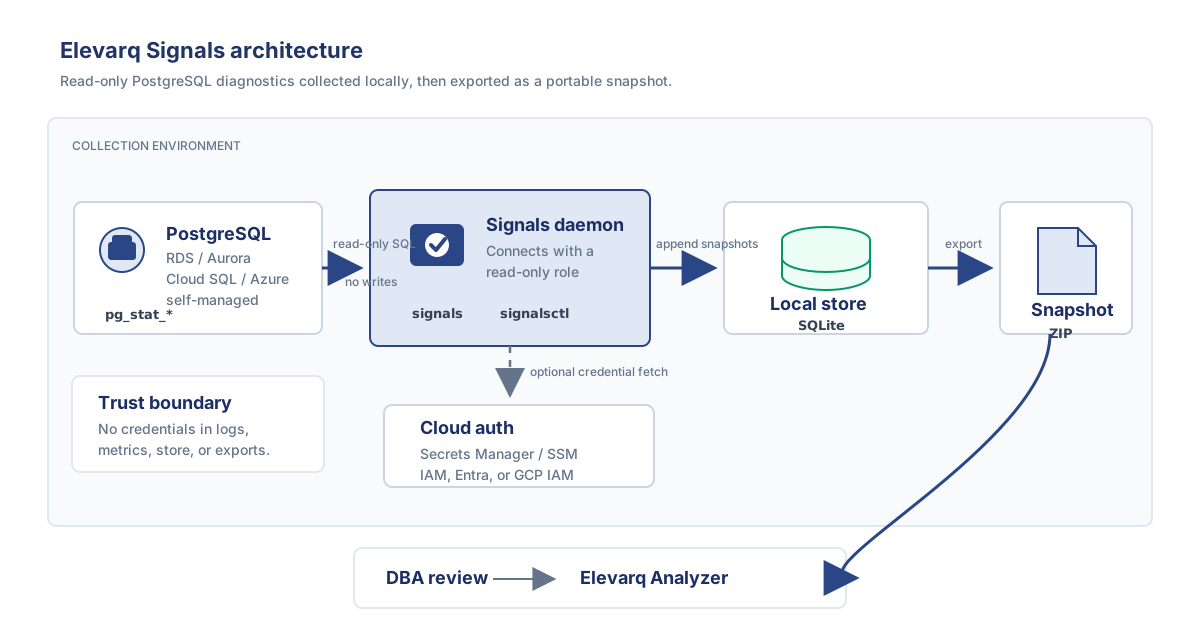
A read-only PostgreSQL diagnostic collector. It connects to the databases you point it at, reads the statistics PostgreSQL already exposes, and packages them as portable ZIP snapshots — for a DBA to review, or for Elevarq Analyzer.
Signals runs as a long-running daemon (signals) driven by a command-line client (signalsctl). It never writes to your databases and makes no outbound connections other than to your targets (plus any cloud authentication you configure). This manual is organised the way you actually use docs — pick the box that matches what you need right now.
Tutorial
Learn by doing
Guided end-to-end paths from nothing to a working collector. Pick your platform.
How-to guides
Solve a specific task
Goal-oriented recipes for the things you will actually do — set up, operate, and recover.
Reference
Look up the facts
Complete, dry technical description of the configuration, the CLI, and every authentication method.
Explanation
Understand the design
Why Signals is built the way it is — the architecture, the read-only guarantees, and the collection cadence.
New to Signals? Begin with the Amazon RDS tutorial, then keep the configuration reference open as you go.