How-to guide
Configure authentication
Pick an auth_method for a target and wire it up — local password, a cloud secret store, or passwordless cloud IAM — with worked AWS recipes.
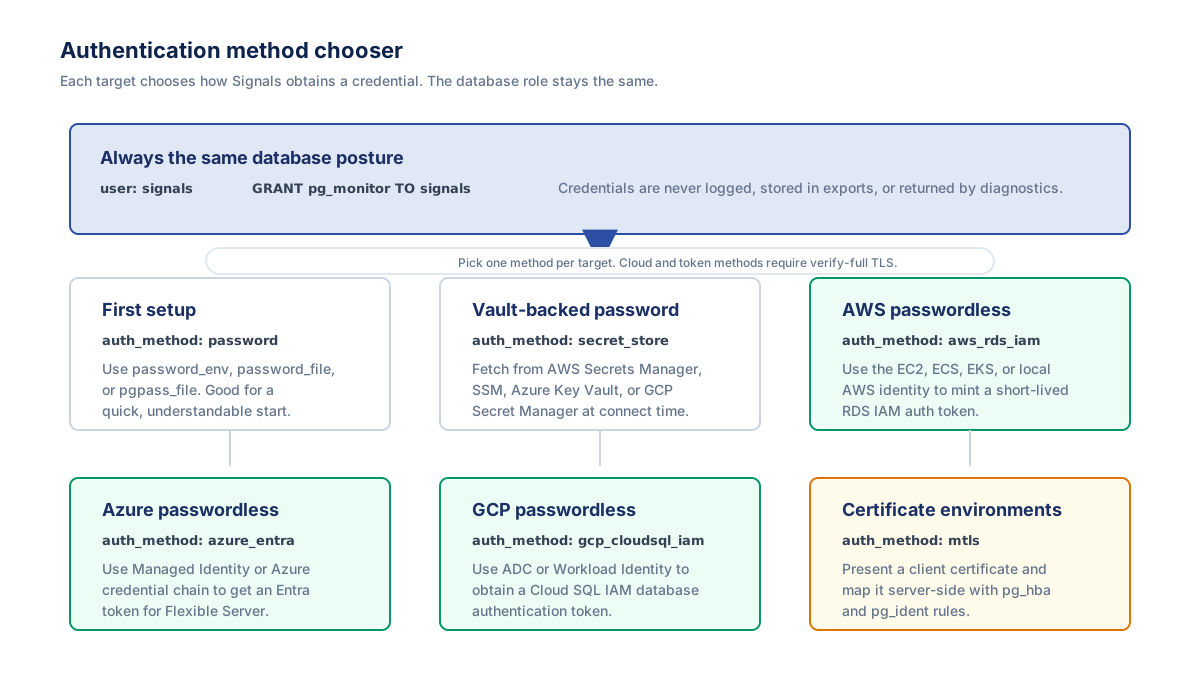
Each Signals target picks one auth_method. It changes only how Signals obtains the credential it connects with — the read-only pg_monitor role and everything it can do are identical for every method. This guide helps you pick a method, then walks the two most common AWS production paths end to end.
Every method authenticates as the same Signals role — a LOGIN role granted pg_monitor. Create it once before configuring authentication (see Create the monitoring role); the recipes below add only the method-specific binding on top of it.
Pick a method
Choose by where your database runs and how you want the credential supplied. Most deployments land on one of these:
- Simplest / first setup —
password(the default). Supply the password out-of-band withpassword_env(an env var name),password_file(a path), orpgpass_file. Never inline a secret in the config. - Production on AWS — either keep the password in a cloud vault with
secret_store(AWS Secrets Manager or SSM Parameter Store), or go passwordless withaws_rds_iamon RDS / Aurora. Both are worked out below. - Azure —
azure_entra(passwordless Entra token) for Azure Database for PostgreSQL Flexible Server. - GCP —
gcp_cloudsql_iam(passwordless Google OAuth2 token) for Cloud SQL for PostgreSQL. - On-prem / self-managed —
password, ormtlswhen the database mandates client-certificate auth.
Two rules hold for every cloud method (aws_rds_iam, azure_entra, gcp_cloudsql_iam, secret_store): it requires sslmode: verify-full with sslrootcert_file in every environment, and pairing a token or secret method with a password_* field is a startup error — the cloud methods are passwordless or vault-backed.
Local password (the default)
The credential is a password supplied locally via exactly one of password_file, password_env, or pgpass_file. Omitting auth_method keeps this behaviour, so existing deployments need no change.
targets:
  - name: prod-primary
    host: db.internal
    port: 5432
    dbname: appdb
    user: signals
    sslmode: verify-full
    sslrootcert_file: /etc/ssl/certs/db-ca.pem
    # auth_method: password   # default — may be omitted
    password_file: /run/secrets/signals_password
AWS production (a): Secrets Manager via secret_store
Keep the database password in AWS Secrets Manager and let Signals fetch it at connect time with the collector's ambient IAM identity. The role is a normal password role whose password is the value stored in the vault.
1. Database — a normal password role
CREATE ROLE signals LOGIN PASSWORD 'matches-the-vault-value';
GRANT pg_monitor TO signals;
2. AWS IAM — read on just that one secret
Grant the collector's workload identity secretsmanager:GetSecretValue on the secret's ARN. The backend is inferred from the ARN shape, and for AWS the region is taken from the ARN — never from the environment.
{
  "Version": "2012-10-17",
  "Statement": [{
    "Effect": "Allow",
    "Action": "secretsmanager:GetSecretValue",
    "Resource": "arn:aws:secretsmanager:us-east-1:123456789012:secret:prod/signals-AbCdEf"
  }]
}
3. Target config
targets:
  - name: selfmanaged-prod
    host: db.internal
    port: 5432
    dbname: appdb
    user: signals
    auth_method: secret_store
    secret_ref: arn:aws:secretsmanager:us-east-1:123456789012:secret:prod/signals-AbCdEf
    secret_json_key: password     # optional; extract one key from a JSON secret
    max_cache_ttl: 15m            # optional; bounds reuse when the vault gives no TTL
    sslmode: verify-full          # required
    sslrootcert_file: /etc/ssl/certs/db-ca.pem
Set secret_json_key to password for a JSON secret like an AWS RDS-managed {"username":"…","password":"…"}; omit it when the secret value is the password. To use SSM Parameter Store instead, point secret_ref at the parameter's arn:aws:ssm:…:parameter/… ARN — that needs ssm:GetParameter (plus kms:Decrypt for a SecureString).
4. Local Docker validation
In EC2, ECS, or EKS, use the instance, task, or pod role. When testing from a laptop, the same ambient AWS identity must be visible inside the container. Add these mounts and environment variables to the docker run command while validating locally:
-v "$HOME/.aws:/home/signals/.aws:ro" \
-e AWS_PROFILE=<profile> \
-e AWS_DEFAULT_PROFILE=<profile> \
-e AWS_SDK_LOAD_CONFIG=1 \
-e AWS_REGION=us-east-1
Do not mount local credentials in production containers; use the workload role for that environment.
AWS production (b): passwordless aws_rds_iam
No stored password at all: Signals mints a short-lived (15-minute) RDS IAM auth token from the collector's ambient AWS identity (EC2 instance profile, ECS task role, EKS IRSA / Pod Identity, or the local AWS credential chain during development) and uses it as the connection password.
1. Instance — turn on IAM database authentication
IAM auth must be enabled on the RDS instance (or Aurora cluster) before any token is accepted — in the console under Modify → Database authentication, or with the AWS CLI:
aws rds modify-db-instance --db-instance-identifier <id> \
  --enable-iam-database-authentication --apply-immediately
# Aurora cluster:
# aws rds modify-db-cluster --db-cluster-identifier <id> \
#   --enable-iam-database-authentication --apply-immediately
2. Database — enable IAM auth for the role
CREATE ROLE signals LOGIN;     -- no password
GRANT rds_iam TO signals;      -- enables RDS IAM authentication
GRANT pg_monitor TO signals;
3. AWS IAM — allow the collector to connect
Attach rds-db:connect on the dbuser ARN to the instance profile / task role / IRSA role:
{
  "Version": "2012-10-17",
  "Statement": [{
    "Effect": "Allow",
    "Action": "rds-db:connect",
    "Resource": "arn:aws:rds-db:<region>:<account-id>:dbuser:<DbiResourceId>/signals"
  }]
}
<DbiResourceId> is the instance/cluster resource id (e.g. db-ABCDEFGH…), not the DB identifier. Retrieve it with the AWS CLI:
# RDS instance:
aws rds describe-db-instances --db-instance-identifier <id> \
  --query 'DBInstances[0].DbiResourceId' --output text
# Aurora cluster:
aws rds describe-db-clusters --db-cluster-identifier <id> \
  --query 'DBClusters[0].DbClusterResourceId' --output text
4. Target config
targets:
  - name: rds-prod
    host: mydb.abc123.us-east-1.rds.amazonaws.com
    port: 5432
    dbname: appdb
    user: signals
    auth_method: aws_rds_iam
    region: us-east-1             # optional; inferred from AWS_REGION / IMDS when omitted
    sslmode: verify-full          # required
    sslrootcert_file: /etc/ssl/certs/rds-global-bundle.pem
    # no password_* / pgpass_file — token methods are passwordless
Download the RDS CA bundle for sslrootcert_file from AWS. If region is neither configured nor in the environment, startup emits a warning and the region is resolved from instance metadata at connect time.
Every other field and cloud
Azure Key Vault and Entra, GCP Secret Manager and Cloud SQL IAM, mTLS, the full per-cloud field matrix, the TLS requirements per method, and the common-error table all live in the reference. This page covers only the common AWS paths — for anything else, go there: Authentication methods (reference).