How-to guide
Export and use snapshots
Get a portable ZIP snapshot out of Signals and put it to work — export the latest or a window, pull it from Docker, schedule with cron, inspect it, archive it, or hand it to Elevarq Analyzer.
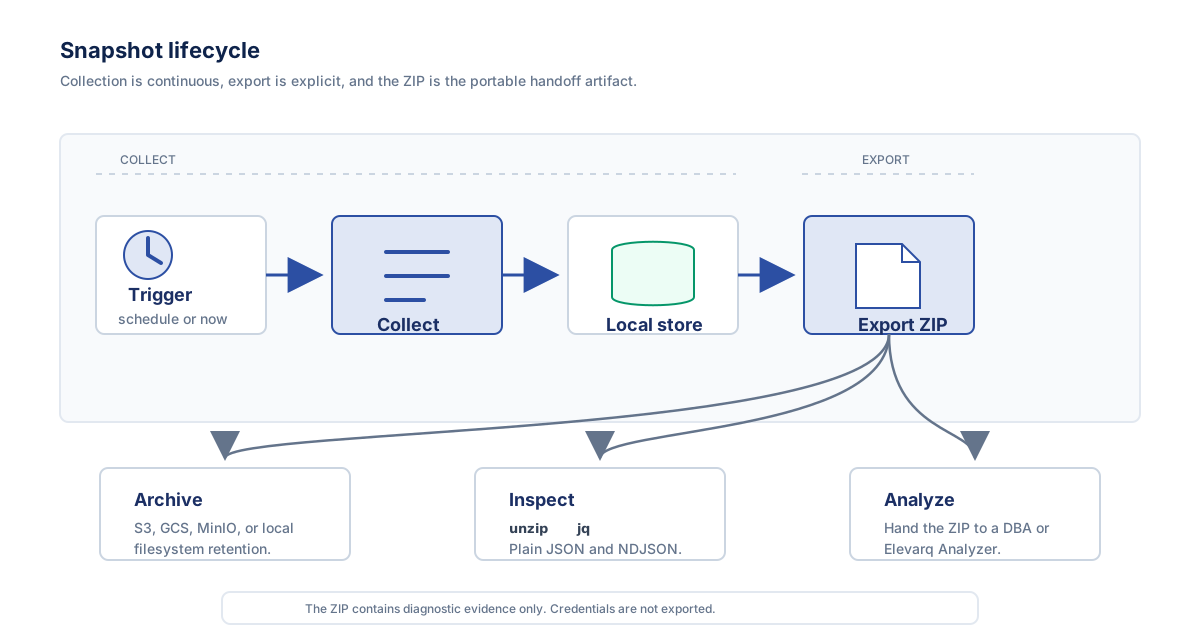
Elevarq Signals keeps every collection in a local SQLite store; a ZIP snapshot only exists once you export one. This guide gets a snapshot out — the latest, a window, or everything — and shows what to do with it: pull it out of Docker, export on a schedule, inspect it with standard tools, archive it, and hand it to Elevarq Analyzer.
Export packages snapshots into a portable ZIP on demand with signalsctl export. The ZIP follows the signals-snapshot.v1 schema — for the exact file layout inside the archive, see the snapshot format reference.
Export the latest snapshot
With no content flags, export contains the latest completed snapshot for each active target. Give it an output path:
signalsctl export --output /path/to/snapshot.zipThe ZIP is written to the -o / --output path you give — a relative path resolves against your current working directory — and signalsctl prints Export saved to <path>. Omit --output and it writes signals-export-<timestamp>.zip into the current directory:
signalsctl export
# Export saved to signals-export-<timestamp>.zip
The file lands wherever you run signalsctl, which need not be the host running the daemon.
Export a window, a target, or everything
Narrow or widen what goes into the ZIP with content flags:
--all— every snapshot in the store, not just the latest.--since/--until— an RFC 3339 time window.--target-id— a single target;--snapshot-id— a single snapshot.
# Everything in the store:
signalsctl export --all --output /path/to/full-history.zip

# A specific time window (RFC 3339):
signalsctl export \
  --since 2026-06-01T00:00:00Z \
  --until 2026-06-08T00:00:00Z \
  --output /path/to/week.zip

# A single target, or a single snapshot:
signalsctl export --target-id primary --output /path/to/primary.zip
signalsctl export --snapshot-id <snapshot-id> --output /path/to/one.zip
Export and retrieve from Docker
Running in Docker, the snapshot store lives inside the container at /data/signals.db (the /data volume). To get a ZIP onto the host, export into that volume, then read it from the mounted directory:
docker exec signals signalsctl export --output /data/snapshot.zipBecause /data is the bind mount, the export lands at ./signals-data/snapshot.zip on the host. If you did not bind-mount /data, pull the file out with docker cp instead:
docker cp signals:/data/snapshot.zip .Can't find the export? In Docker it is written inside the container under /data. Bind-mount ./signals-data:/data so it appears on the host, or copy it out with docker cp.
Schedule exports with cron
The daemon already schedules collection on its own poll_interval — cron is only for getting ZIPs out on a cadence, for example to feed an archive. Run a timestamped export from the long-running daemon:
# Export a snapshot every hour
0 * * * * /usr/local/bin/signalsctl export --output /var/snapshots/signals-$(date +\%Y\%m\%d-\%H\%M).zip
The % characters are escaped as \% in a crontab — cron treats an unescaped % as a newline in the command. Each run writes a distinct file because the filename carries the date and time.
Inspect a snapshot with unzip and jq
The signals-snapshot.v1 format is a ZIP archive containing NDJSON files. There is no proprietary container and no embedded credentials, so you can parse it with standard tools:
# List contents
unzip -l snapshot.zip

# Extract and process with jq
unzip -p snapshot.zip "*.ndjson" | jq '.query_name'
For the role of each file in the archive — metadata.json, query_catalog.json, query_runs.ndjson, and query_results.ndjson — see the snapshot format reference.
Archive snapshots to object storage
Snapshots are self-contained and immutable. Store them in any object store (S3, GCS, MinIO) or local filesystem for historical analysis. To upload to S3, partitioned by date:
# Upload to S3
aws s3 cp snapshot.zip s3://my-bucket/signals/$(date +%Y/%m/%d)/
Combine this with the cron export above to build a rolling archive: export a timestamped ZIP on a schedule, then copy it to object storage in the same job.
For the Elevarq Cloud products, this same export-to-S3 step is how snapshots reach the analyzer running in EKS: Signals writes ZIPs to a bucket prefix (with a least-privilege s3:PutObject identity) and the analyzer syncs them from that prefix into its inbox. See Cloud snapshot delivery via S3 for the end-to-end setup and the exact IAM policies for both sides.
Feed a snapshot to Elevarq Analyzer
The most common reason to export is to hand the snapshot to Elevarq Analyzer for diagnosis and recommendations. Export a ZIP and carry it over your approved transfer path — it is a plain ZIP of JSON and NDJSON, so it moves cleanly across a trust boundary, including into a separate air-gapped environment:
signalsctl export --output snapshot.zip
# then hand snapshot.zip to Elevarq Analyzer
Credentials never appear in snapshots, logs, metrics, or exports, so a ZIP is safe to move out of the collection environment and analyse elsewhere.