Tutorial
Get started on Amazon RDS
A guided walkthrough that takes an Amazon RDS or Aurora PostgreSQL database to a first Elevarq Signals snapshot using Docker.
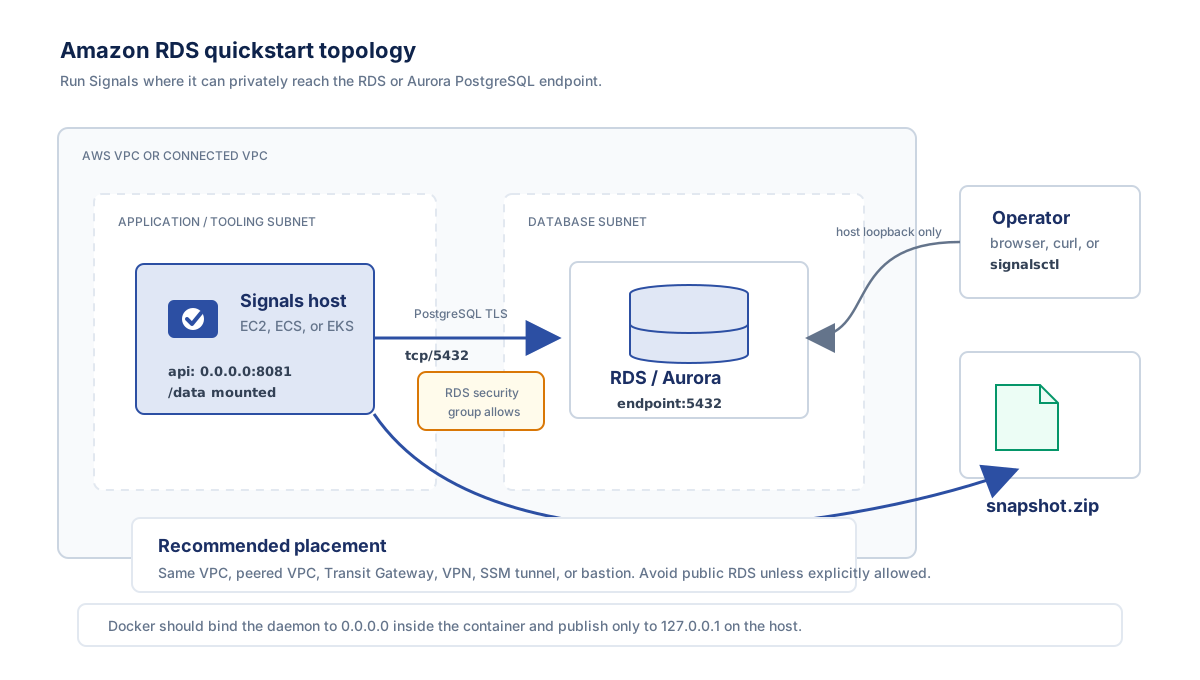
Follow this guided path to take an Amazon RDS or Aurora PostgreSQL database from nothing to a first Elevarq Signals snapshot. It assumes you know AWS but not PostgreSQL internals — the only database step is pasting a short block of SQL — and it ends with a working snapshot on your host.
Topology
Signals connects to RDS like any database client, so it has to sit on a network path that reaches your database:
- Recommended: run Signals on EC2, ECS, or EKS in the same VPC (or a peered / Transit Gateway-connected VPC) as the database.
- From a laptop only if a VPN, AWS SSM port-forward, bastion, or other private routing reaches the endpoint — RDS is normally not publicly reachable.
- The RDS security group must allow inbound TCP 5432 from the Signals host (by security-group ID or CIDR).
- Point Signals at the cluster/instance endpoint (e.g.
mydb.abc123.us-east-1.rds.amazonaws.com). That endpoint hostname is not the database name — the database name is the logical DB inside it (oftenpostgresor your application's database).
Prerequisites
- An RDS or Aurora PostgreSQL 14+ instance: its endpoint, port (
5432), database name, and the master (admin) username. - Network reach from where Signals will run to that endpoint — confirm with
psqlfirst (step 1). docker(this guide) or the host binaries.- The RDS CA bundle, for
verify-fullTLS (downloaded in step 1). - Optional: the AWS CLI, only if you later use Secrets Manager, Parameter Store, or RDS IAM auth.
1. Confirm you can reach the database
Download the RDS global CA bundle, then connect as the master user over verify-full TLS. If this fails, fix networking or TLS before going further:
mkdir -p signals-data
curl -fsSL -o signals-data/rds-global-bundle.pem \
  https://truststore.pki.rds.amazonaws.com/global/global-bundle.pem

psql "host=<your-endpoint>.rds.amazonaws.com port=5432 dbname=<dbname> \
  user=<master-user> sslmode=verify-full \
  sslrootcert=signals-data/rds-global-bundle.pem"
2. Create the read-only Signals role
On RDS/Aurora the master user is not a full PostgreSQL superuser, but it is the role you use to run this one-time setup. Run it once per database cluster, connected to the database you want to observe:
-- as the master user, connected to <dbname>:
CREATE ROLE signals LOGIN PASSWORD '<choose-a-strong-password>'
  NOSUPERUSER NOCREATEDB NOCREATEROLE NOREPLICATION NOBYPASSRLS;
GRANT pg_monitor TO signals;
GRANT CONNECT ON DATABASE <dbname> TO signals;
Verify the role by connecting as signals in a fresh session — on RDS/Aurora a SET ROLE test from the master user is not a reliable check, so connect as the role itself, using the same host and TLS settings:
psql "host=<your-endpoint>.rds.amazonaws.com port=5432 dbname=<dbname> \
  user=signals sslmode=verify-full \
  sslrootcert=signals-data/rds-global-bundle.pem"
Then, in that session:
SELECT count(*) FROM pg_stat_database;   -- succeeds: read access
CREATE TABLE _signals_check (id int);    -- fails: permission denied
3. (Optional) Enable query statistics
pg_stat_statements adds query-level statistics. It is optional — Signals collects everything else without it. On RDS/Aurora you do not edit postgresql.conf; instead:
- In a custom DB parameter group, add
pg_stat_statementstoshared_preload_librariesand attach the group to the instance/cluster. - Reboot the instance if RDS marks the change pending-reboot.
- Then, connected to the database, run
CREATE EXTENSION IF NOT EXISTS pg_stat_statements;
4. Write the config and an API token
# API token shared by the daemon and signalsctl:
openssl rand -hex 32 > signals-data/api-token

cat > signals.yaml <<'YAML'
signals:
  poll_interval: 6h
  retention_days: 30
api:
  listen_addr: 0.0.0.0:8081   # bind inside the container; -p limits exposure to loopback
database:
  path: /data/signals.db
targets:
  - name: primary
    host: <your-endpoint>.rds.amazonaws.com
    port: 5432
    dbname: <dbname>
    user: signals
    sslmode: verify-full
    sslrootcert_file: /data/rds-global-bundle.pem
    password_env: SIGNALS_PRIMARY_PASSWORD
YAML
This takes the password from an environment variable (password_env) to keep the first run simple. For production, keep the secret out of the environment: store it in AWS Secrets Manager or SSM Parameter Store (auth_method: secret_store), or drop the password entirely with passwordless RDS IAM (aws_rds_iam). See Authentication methods for all options.
5. Run the container
Bind-mount ./signals-data to /data so the SQLite store, the CA bundle, the token, and any exports all live in a directory you can see on the host:
docker run -d --name signals \
  -v "$PWD/signals.yaml:/etc/signals/signals.yaml:ro" \
  -v "$PWD/signals-data:/data" \
  -e SIGNALS_API_TOKEN="$(cat signals-data/api-token)" \
  -e SIGNALS_PRIMARY_PASSWORD="<the-password-from-step-2>" \
  -p 127.0.0.1:8081:8081 \
  ghcr.io/elevarq/signals:<version>
Which version? Replace <version> with a release tag from the Signals releases page and use the matching GHCR image tag. Pin a concrete tag (for example, 0.10.0-rc.1) instead of assuming latest exists. Release names may include a leading v, while image tags can omit it, so confirm the tag with docker pull before using it in a script.
The control API is bound to 0.0.0.0:8081 inside the container so the published port works, while -p 127.0.0.1:8081:8081 restricts exposure to your host's loopback — reachable from this host and via docker exec, never from the network.
6. Verify, collect, export
Drive the running daemon with signalsctl inside the container — it inherits SIGNALS_API_TOKEN, so it authenticates to the local API automatically:
docker exec signals signalsctl status
docker exec signals signalsctl connect test primary
docker exec signals signalsctl collect now
docker exec signals signalsctl export --output /data/snapshot.zip
Because /data is the bind mount, the export lands at ./signals-data/snapshot.zip on the host (or pull it with docker cp signals:/data/snapshot.zip .). You now have a working snapshot.
Running docker exec signals signalsctl status shows the collector state per target; connect test primary confirms connectivity before you rely on the schedule.
Where next
From here, move to the how-to guides for production credentials and day-to-day operations: Configure authentication, Run as a service, and Debug connection issues.